

Student Reports
Overview
The Department of Data, Analytics, & Institutional Research (DAIR) has partnered with The Graduate College to provide advisors/departments the ability to generate various applicant/student reports at-will. These reports are maintained by DAIR and are hosted through Tableau.
For more information on this resource, please visit contact the DAIR.
Accessing/Navigating CatStats
-
How do I gain access to CatStats?
Access will be automatically granted based on your affiliation as a University employee, except in cases when your primary role is “Student Employee.”
-
Where do I log in to CatStats?
Off-campus/VPN Disclaimer Due to the sensitive student information presented throughout CatStats Reports, access to CatStats may require either an on-campus device OR an active Virtual Private Network (VPN) session. For more information regarding TXST VPN setup, please visit ITAC's website.
TXST CatStats Portal
https://catstats.txstate.edu/You will be asked to sign in using your:
- Texas State NetID (e.g., abc123),
- NetID password, and
- two-factor authentication (Duo)
-
How do I filter results reports within CatStats?
1. Various filters will be found along the top section of most reports and clearly indicate the various parameters that you can set:

2. You may select one or many filters at a time by clicking each drop-down menu and checking the desired parameters.
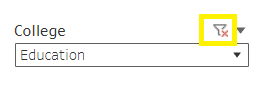
For example, to filter the report results to display only applicants/students in the College of Education, use the College filter to un-select “All” and then select “Education," then click “Apply.”

To quickly un-filter/reset the results, click the “Red-X-Funnel” icon above the filter:
-
How do I export report results (PDF, Excel, etc.)?
After filtering the results to your desired interests, you can either click the Adobe PDF icon on the top-left of the report to generate a PDF export:

…or you can select a variety of exports format from the Download menu (on the top-right corner):

Recommended Reports
-
Applicants/Admissions
-
Enrollment/Student Outcomes
- Academic Program Review (All)
- Instructional Faculty with Sections Taught by Level
- Average Teaching Load
- Student-to-Faculty Ratio
- Student Demographics by Classification
- Student Demographics by Gender
- Student Demographics by Race\Ethnicity
- Student Demographics by Probation and Suspension Status
- Student Time to Degree in Years
- Student Completions by Time to Degree
- Retention Rates for First-time, Full-time Undergraduate students
- Retention Rates for First-time, Full-time Masters students
- Retention Rates for First-time, Full-time Doctoral & Professional students
- Retention Rates for Transfer, Full-time Undergraduate students
- Graduation Rates for First-time, Full-time Undergraduate students
- Graduation Rates for First-time, Full-time Masters students
- Graduation Rates for First-time, Full-time Doctoral students
- Graduation Rates for Transfer, Full-time Undergraduate students
- Semester Credit Hours by Student Level
- Graduate Placement
- Number of Degrees Conferred
- Admissions Scores for First-time, Full-time Undergraduate Students
- Admissions Scores for First-time, Full-time Masters Students
- Admissions Scores for First-time, Full-time Doctoral Students
- Glossary: Definitions and Formulas
- Administrator Overview (All)
- Enrollment (All)
- Student Outcomes (All)
- Academic Program Review (All)